StbEmu (Pro)
- 3.3
- Rating
- 100.00K
- Installs
- $5.49
- Price

 Analysis by App-foxy
StbEmu (Pro) is the kind of Android app that makes sense only when you already know why you need an IPTV box emulator. I found it much more focused than the usual video players: it is not designed to organize a personal movie library, edit clips, or replace a general streaming service. Its job is to reproduce the experience of certain IPTV set-top boxes, giving compatible service configurations a television-style interface on an Android device. That narrow purpose is both its main strength and its biggest warning sign.
After using it, my overall view is fairly clear: StbEmu (Pro) is best for people who already have a legitimate IPTV subscription and want a box-like way to access it. It is considerably less appealing if you simply want to watch local videos, cast content, or find an app that works immediately after installation. The interface and setup require patience, but the focused design can be useful when a provider expects a specific box profile rather than a standard playlist player.
What the app is really built to do
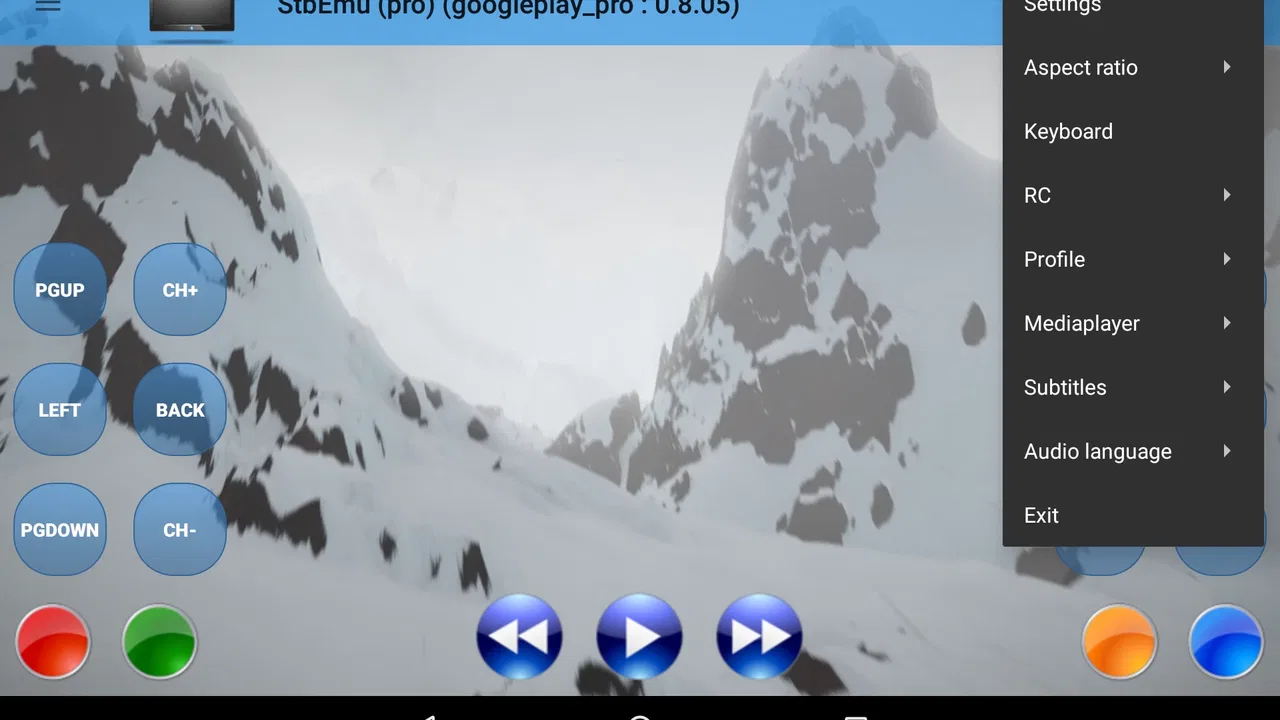
The app sits in the video players and editors category, although “video player” can give the wrong impression. I would not compare it directly with a simple media player that opens files from your phone. StbEmu (Pro) acts more like a software version of selected IPTV hardware. In practical terms, you configure an emulated box profile, connect it to the service details supplied by your IPTV provider, and then use the resulting television-style environment.
You May Also Like

 Blood Strike: 2.5 Anniversary
Blood Strike’s Loadouts Turn Every Drop Into a Tactical Gamble
A close look at Blood Strike’s custom loadouts: how fast access to signature weapons reshapes its battle royale rhythm, rewards preparation, and narrows the gap between fights.

 Pandora - Music & Podcasts
Pandora’s Music Is Easy to Start, but Harder to Recover
Pandora’s strength is its low-effort path from a seed to a station. Its weak spot is how much confidence it asks you to place in connection, setup, and quiet recovery.

 8 Ball Pool
 Is Built on Rivalries, Rematches, and Routine
A close look at the rivalries, rematches, shared routines, and unanswered safety questions that turn a quick pool match into a persistent mobile community.

 Samsung Music
’s Quiet Strength Is Playing What You Already Own
Its reach comes less from spectacle than from dependable access to a personal library. That simplicity is both the app’s strongest retention engine and its ceiling.

 AccuWeather: Weather Radar
AccuWeather Review: A Quick, Clear Forecast for Everyday Decisions
For everyday plans, the best forecast is the one you can understand quickly. AccuWeather makes rain timing, radar, and local conditions easy to act on, with a few trade-offs.

 Hill Climb Racing
Why Hill Climb Racing Still Turns Crashes Into One More Run
A tiny car, a bumpy hill and one more upgrade: Hill Climb Racing keeps resurfacing because its simple chaos makes every near-miss feel personal.
More From Our News Desk
View All News


That distinction matters because the first experience is not usually plug-and-play. The application’s value depends on the relationship between the emulator, the provider’s configuration, and your Android device. If any of those pieces do not match, the app may feel confusing even though the installation itself is straightforward. I would treat it as a compatibility tool rather than a universal gateway to every IPTV service.
The developer is M Vasilchuk, and the app has been available since June 29, 2016. Its current release is v2.0.23.01, while Android 8.0 is the minimum operating system requirement. That makes it relevant to a broad range of Android hardware, including older devices that may not run some newer television applications. At the same time, compatibility with Android does not automatically mean compatibility with every television, remote control, provider portal, or box profile.
The store summary describes it as an emulator for specific IPTV boxes, and that word “specific” should guide your expectations. I would not install it hoping that it will discover channels or create a television service for you. You need a lawful service arrangement and the correct configuration information. The app supplies the client experience; it does not replace the provider behind that experience.
The setup rewards careful preparation
The most important practical lesson is to collect your provider’s details before starting. IPTV services may use different portal addresses, device identifiers, login methods, or profile expectations. Entering a random address and repeatedly changing settings is a poor way to troubleshoot. I had a much better experience treating setup like configuring a physical receiver: note each value, change one setting at a time, and restart only after checking the complete profile.
Another useful habit is to create a simple record of the working configuration. This is especially helpful if you use the app on more than one Android device. A television and a phone may need different navigation habits, but the service details should remain organized and easy to re-enter. I would keep that record private, because IPTV credentials and portal information should not be shared casually.
The emulator approach can also explain why a provider recommends this app instead of a playlist-based player. Some services are built around a particular set-top-box environment, so a generic player may not reproduce the expected menus or authentication flow. In that situation, StbEmu (Pro) can be a more sensible choice than forcing the service into an app designed for a different format.
Where the television-style approach works well
Once the configuration is working, the main benefit is familiarity. The app is aimed at a living-room viewing pattern rather than a phone-first browsing experience. That can make sense on an Android TV device or a television connected to Android hardware, where channel navigation and remote control are more natural than tapping through a mobile playlist.
I can also see a practical use for households that want one consistent box-like interface without purchasing another physical receiver. A spare Android device can become the access point for the service, provided the hardware and provider setup are compatible. This is not the same as turning any phone into a perfect television box, but it can reduce the need to switch between several unrelated IPTV applications.
The focused interface is valuable when you already know the service you want to use. Instead of presenting a long list of unrelated playback tools, it keeps attention on the IPTV environment. That makes it easier to explain to someone who only wants to turn on the television and browse the channels supplied by their service. The trade-off is that the app offers less flexibility than a modern media hub built around multiple sources.
Three details that can save time
First, do not judge the app by the first screen alone. An IPTV emulator often appears unhelpful until the correct profile and portal information are in place. If your provider specifically mentions a supported box type, use that guidance rather than selecting settings at random. This is a small change in approach, but it prevents many false conclusions about whether the app works.
Second, test the complete viewing path instead of checking only whether a menu loads. A service may appear to connect while channel navigation, program information, or playback behaves differently from the provider’s intended box. I would test several ordinary channels, move through the main menus, and confirm that the remote or touch controls feel manageable before deciding that the setup is finished.
Third, separate provider problems from application problems. If the same service details fail on every compatible device, changing the emulator repeatedly may not help. Conversely, if the service works elsewhere but this installation does not, then the profile, device environment, or local configuration deserves attention. This simple comparison is more useful than assuming every error comes from one side.
A fourth point is easy to overlook: the best device for this app is not necessarily the device with the largest screen. A television-oriented setup needs comfortable navigation, while a phone may be useful only for testing or occasional viewing. If you plan to use it from the sofa, check whether your Android hardware and remote provide a practical way to move through the interface. A technically successful installation can still be unpleasant if every action requires awkward touch input.
The important limitations before you pay
StbEmu (Pro) costs $5.49, so the purchase deserves a little thought. The price is not the only commitment. You are also committing to a specialized workflow that may depend on your IPTV provider’s instructions. If your service does not support the type of box the app emulates, buying it will not solve that mismatch. I would confirm compatibility with the provider first rather than treating the purchase as an experiment.
The app’s average rating is 3.3 from around 1.7 thousand ratings, with about 200 written reviews. I read that as a sign of a product with a divided user experience rather than an automatic failure. People who need the exact emulator and understand the setup can find it useful, while people expecting a polished, general-purpose streaming app may be disappointed. The rating fits that specialized nature.
The largest weakness is the learning curve. StbEmu (Pro) does not hold your hand in the way many mainstream streaming applications do. You may need to understand what your provider means by a portal, a box profile, or a device-specific configuration. Even when the app is working correctly, the experience may feel closer to operating IPTV hardware than browsing a modern catalog.
That can be frustrating for casual viewers. If your goal is to open an app, sign into a familiar service, and immediately choose a film, this is probably the wrong tool. A mainstream streaming app is easier for that use case because the catalog, account system, playback environment, and support process are all handled in one place. StbEmu (Pro) assumes that another service supplies much of the content and configuration.
It is also not the obvious choice for local files. A dedicated Android media player is generally better when you want to browse videos stored on a phone, memory card, network drive, or home server. Likewise, a playlist-focused IPTV player may be more convenient if your provider gives you a standard playlist and does not require a set-top-box emulation environment. The right choice depends on the format and workflow your service actually uses.
There is a further trade-off between authenticity and flexibility. Emulating a particular box can improve compatibility with a matching service, but it can also limit how freely you customize the experience. If you prefer a unified interface that combines several providers, personal media, casting, recommendations, and multiple playback engines, a broader media center will likely suit you better. StbEmu (Pro) is strongest when its narrow role is exactly what you need.
Who should use it, and who should skip it
I would recommend it to an Android user who already has a legitimate IPTV subscription, has been told to use a compatible set-top-box profile, and wants a television-like interface. It may also suit someone replacing a dedicated box with Android hardware, provided they are comfortable following configuration instructions and troubleshooting methodically.
I would be more cautious about recommending it to a first-time IPTV user. The app does not make the wider IPTV process simple by itself. You still need a trustworthy provider, valid access details, and enough technical patience to identify whether a problem comes from the service, the profile, the device, or the network. Someone who dislikes setup screens will probably have a better experience with a provider’s own application.
I would also skip it if you are looking for free channels, a built-in content catalog, or a way around a provider’s access rules. The emulator is not a substitute for a subscription and should be used only with content you are authorized to watch. That is not merely a legal consideration; it is also practical, because unofficial services often create the exact reliability and support problems that make troubleshooting difficult.
A realistic evening with the app
Imagine a household with an Android television device and an IPTV service that recommends a particular box environment. The owner installs the app, enters the provider’s portal information, selects the appropriate emulation profile, and tests the interface with the remote. Once everything is stable, family members can use the television in a familiar channel-browsing manner without learning a separate playlist application.
That scenario shows the app at its best: the service already exists, the hardware is suitable, and the user values a box-like interface more than a modern design. It also shows the hidden cost. The owner must spend time documenting the settings and checking navigation before handing the remote to someone else. If the provider changes its configuration, the household may need to repeat part of that process.
On a phone, the same scenario is less convincing. StbEmu (Pro) may still be useful for checking access away from home, but a touch screen does not automatically recreate the comfort of a living-room receiver. I would use the phone as a secondary device only if the service and controls remain practical there, not because the app’s Android compatibility guarantees a good mobile experience.
My verdict after weighing the trade-offs
StbEmu (Pro) is a specialized solution with a clear purpose, not an all-purpose video application. Its strongest quality is the ability to reproduce a compatible IPTV box experience on Android, which can be exactly what a provider or household needs. Its weakest quality is the amount of responsibility left to the user: configuration, compatibility checks, troubleshooting, and choosing the right hardware all matter.
The app has passed the point where it can be considered new, having been released in 2016, and its current v2.0.23.01 release keeps it relevant for users on Android 8.0 or later. It carries an Everyone content rating and has reached over 100 thousand installs, which shows that the emulator has found a real audience. Those figures do not change the central question, though: whether your IPTV service actually fits the box model this app is designed to reproduce.
For the right person, the $5.49 purchase can be reasonable because it solves a specific compatibility problem and offers a familiar television workflow. For everyone else, the cost may buy frustration rather than convenience. My recommendation is simple: ask your IPTV provider which client or box profile it expects, verify that StbEmu (Pro) matches that instruction, and only then choose it. If your priority is a compatible set-top-box experience rather than effortless streaming, this app is worth considering; if you want simplicity and broad media support, choose a more conventional player instead.
FAQs for StbEmu (Pro)
01What is StbEmu (Pro), and what can I use it for?
StbEmu (Pro) is an IPTV player designed to emulate the functionality of a set-top box on compatible Android devices. It does not provide television channels, movies, series, or subscriptions by itself. Instead, it connects to an IPTV service supplied by your provider, usually through a portal or server address. The Pro version focuses on delivering a more complete viewing experience with additional configuration options and fewer limitations than the standard edition.
02Does StbEmu (Pro) include IPTV channels or a subscription?
No. StbEmu (Pro) is only a media player and set-top-box emulator, so downloading it does not give you access to live channels or on-demand content. You must obtain a valid subscription and portal details from an IPTV provider separately. Before installing the app, confirm that your provider supports the Stalker Middleware or portal system used by the application, and only access content you are legally authorized to watch.
03Which devices are compatible with StbEmu (Pro)?
StbEmu (Pro) is primarily intended for Android devices, including smartphones, tablets, Android TV boxes, and many smart televisions running Android TV. Compatibility can vary depending on the device, Android version, remote-control support, and screen layout. It generally works best on larger screens when the provider’s service is configured correctly. Users should also check whether their device can install the app from an official and trusted source before purchasing or downloading it.
04How difficult is it to set up StbEmu (Pro)?
Setup is manageable, but it may feel less straightforward than using a typical streaming app because the application requires manual configuration. You normally need to create a profile, enter the portal URL supplied by your IPTV provider, and adjust device or network settings when necessary. The exact steps can differ between providers. If the portal address, MAC-related information, or server configuration is incorrect, the app may open normally but fail to load channels.
05Is StbEmu (Pro) safe, legal, and worth downloading?
The application itself is a player, so its legality depends largely on how it is used and whether your IPTV provider has the necessary rights to distribute its content. Download StbEmu (Pro) only from a reputable official store or trusted developer source, and avoid modified APK files that may contain malware. It can be worthwhile for users who already have a compatible legal IPTV subscription and want set-top-box-style playback, but it may not suit beginners seeking an all-in-one streaming service.
Pros
- Supports multiple IPTV portal profiles for flexible service switching.
- Offers extensive emulator settings for advanced IPTV configuration.
- Compatible with common remote-control navigation on TV devices.
- Includes EPG support when provided by the IPTV service.
- Pro version removes advertising for a cleaner viewing experience.
Cons
- Requires a valid IPTV portal; it does not provide channels or subscriptions.
- Initial setup can be confusing for users unfamiliar with MAC portals.
- Performance depends heavily on the IPTV provider and internet connection.
- Some features may vary across phones
- TV boxes
- and Android versions.
- Limited official troubleshooting if a third-party IPTV service fails.

StbEmu (Pro)
Gallery